Creating and Editing a Linux Patch Deployment Configuration
A Linux patch deployment configuration defines how a patch deployment will be performed. The contentless patching method performs a scan for all missing patches as a part of all Patch Deployment Configurations.
Security Controls provides one predefined configuration named Update All. This configuration specifies that the agent will deploy all patches that were identified as missing by a patch scan. A patch group will not be used and a post-deploy reboot will not be performed.
You cannot edit the predefined configuration. If the predefined configuration is not adequate for your needs, you can create a custom configuration, as described.
 Contentless patching
To work with a custom contentless Linux patch deployment configuration, do one of the following:
- To create a new deployment configuration:
- Click New > Linux Patch > Patch Deployment Configuration
- In the Linux Patch Deployment Configurations list (
 ) in the navigation pane, right-click and select New Linux Patch Deployment Configuration
- To edit an existing configuration, in the Linux Patch Deployment Configurations list, double-click the deployment configuration name
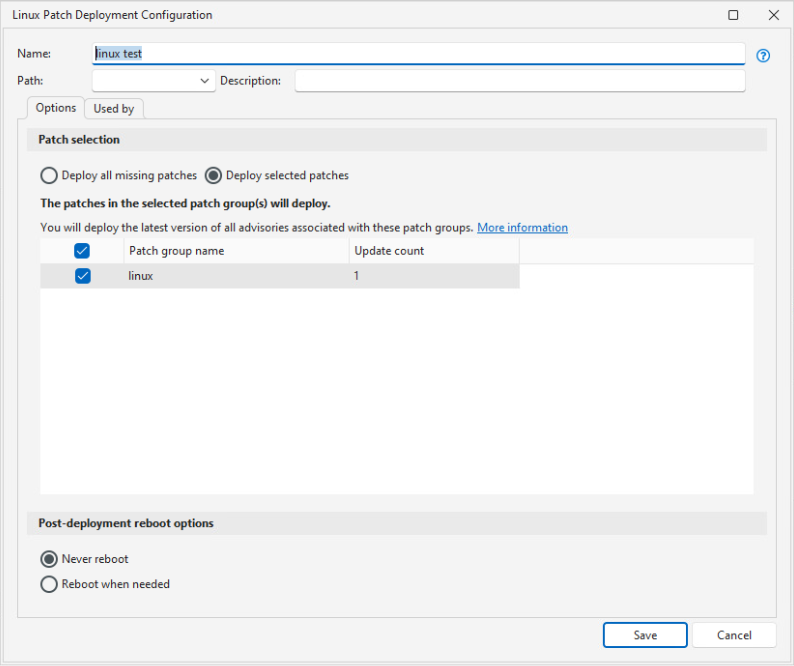
| Field | Descriptions |
|---|---|
|
Name |
The name that you wish to assign to this configuration. |
|
Path |
This box is used to specify the folder path that this configuration will reside in within the Linux Patch Deployment Configurations list in navigation pane. If you do not specify a path, the configuration will reside at the root level of the My Linux Patch Deployment Configurations list. For more details, see Organizing Linux Patch Groups and Configurations. |
|
Description |
A description of the configuration. |
|
Deploy all missing patches |
If enabled, all patches that were identified as missing by the scan that is run as part of the deployment will be deployed. |
|
If enabled, only those patches that were identified as missing by the scan that is run as part of the deployment and that match the configured criteria will be deployed.
Security Controls follows the convention in patching Linux devices by always updating to the latest package available in the repository, even if an earlier version is selected. Note that for some distributions this is actually the only option available, as earlier versions of a package are not available from the repository. |
|
|
Post-deployment reboot options |
Enables you to specify whether or not to allow post-deployment reboots. You specify settings for reboot countdowns and so on in the Server/Linux patch section of the Agent Reboot Options tab on the Agent Policy Editor dialog (see Agent Reboot Options). If you select Deploy selected patches, packages that are dependencies for the specified advisories are installed in addition to the packages associated with the advisories in the patch groups. If you then set Post-deployment reboot options to Reboot when needed, these dependencies may additionally cause a reboot. Remember that some updates require a reboot and that in these instances a machine is vulnerable until it reboots, so we recommend Never reboot only for servers with scheduled maintenance windows. |
|
Used by tab |
This tab shows you the agent policies that are currently using this configuration. This is important to know if you are considering modifying the configuration, as it tells you which agents are affected. |
If an Oracle Linux machine has both the Red Hat Compatible Kernel (RHCK) and the Unbreakable Enterprise Kernel (UEK), both kernels are scanned and patched. However, because the non-running kernel is not running and so is not vulnerable, its advisories are always reported as Installed.
Deployments are Performed Using YUM
Yellowdog Updater, Modified (YUM) is a command-line utility that is used for retrieving, installing and managing RPM packages from official Red Hat and CentOS software repositories. When an agent needs to deploy a patch, it does so by instructing YUM to download and install the patch. If you have Linux client machines that reside in a disconnected network, the agent will not be able to utilize YUM and you must set up one or more local repositories.